The window / Page 14 of 53
This page is one part of The Ishoo manual. The complete manual is a single page, short enough to read in one go: ishoo.app/docs/
Home: the timeline
The Ishoo Home timeline is the project’s full recorded history, newest first and grouped by day: tasks filed, started, split and landed, plans made, decisions recorded and releases. It can be filtered by kind and searched by id or title.
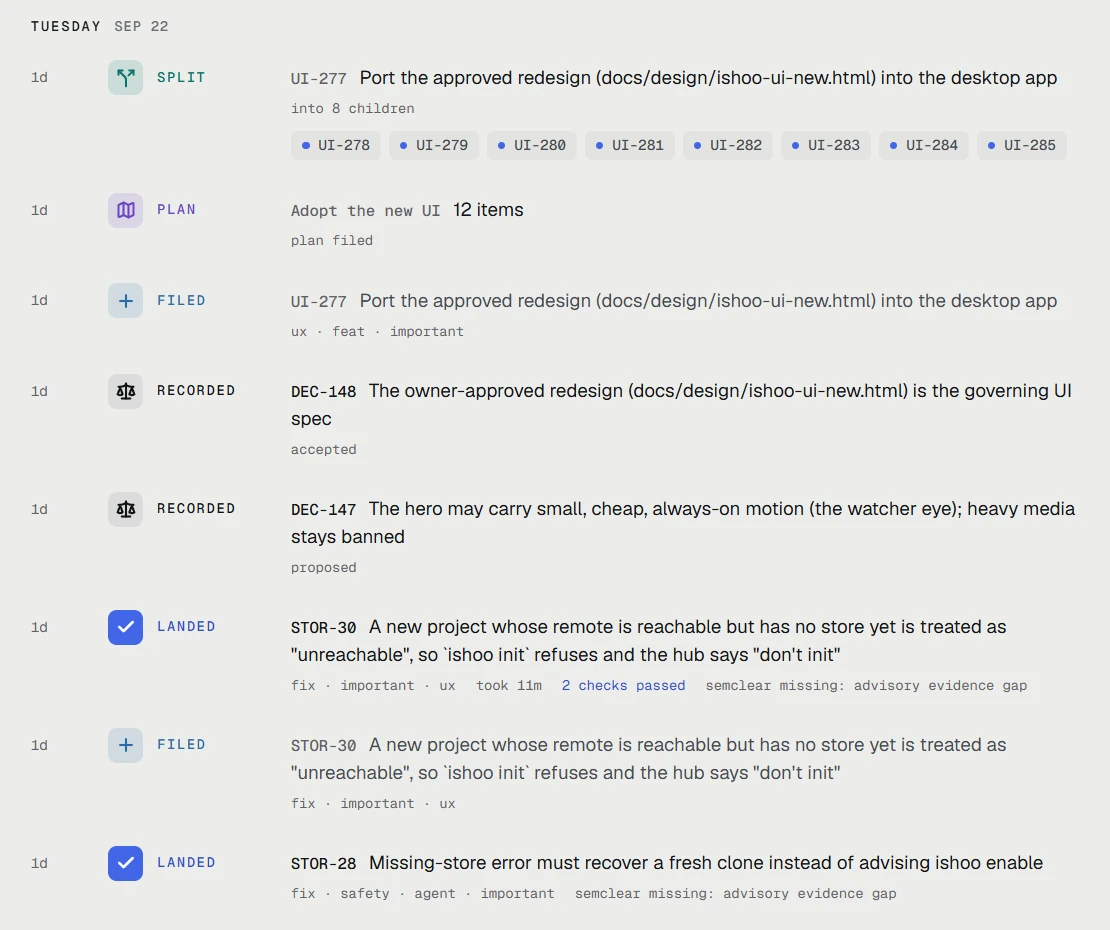
| Row | What it records |
|---|---|
| Started | Work began on a task. |
| Landed | A task was finished and integrated. The row shows how long it took, from start to landing. |
| Release | A version of the project was published. |
| Split | A task was broken into smaller ones. Its children show as chips you can click. |
| Filed | A new task was written. |
| Plan | A named plan was made. Clicking it opens Your plan. |
| Recorded | A decision was recorded. |
The chips above the list filter to one kind (All, Started, Landed, Releases, Splits, Filed, Plans, Decisions). The search box matches a task id or title. Days are headed Today, Yesterday, then weekday and date.
The line beside the chips counts exactly what is shown: how many events, and how many of them landed. The timeline shows 60 rows at a time; Show more loads the next page, so a project with thousands of events stays fast.
How it works: history you can trust
Each row is built from a timestamp Ishoo recorded when the thing happened: when a task was filed, started or closed, when a decision was recorded. Rows are never reconstructed afterwards or estimated. If a time wasn’t recorded, that event simply isn’t shown, rather than being placed at a guessed moment.